
VRF Heat Recovery - Heating Mode Missing from Controller
Troubleshooting missing HEAT mode on previously commissioned VRF heat recovery systems
A VRF heat recovery system that previously operated correctly in both heating and cooling may suddenly lose the ability to select HEAT mode from the wired controller.
A faulty Refrigerant Branch (RB) unit PCB has been identified as the cause of this symptom on a previous installation.
1. Identifying the Symptom
The following symptoms have been reported:
- System is an AIRSTAGE VRF heat recovery installation.
- Heating and cooling were both functioning correctly following commissioning.
- HEAT mode is no longer available for selection on the wired controller.
- Other operating modes, including COOL, DRY and FAN, may remain visible.
- The installation also incorporates a central controller.
- No intentional programming changes have been reported.
Example - Wired Controller Mode Selection
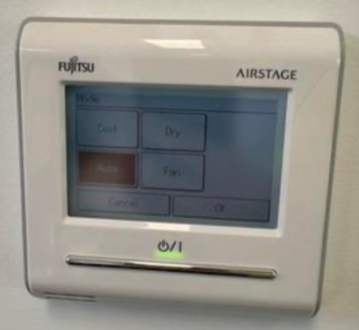
Example of the operating mode selection screen where HEAT mode is unavailable or cannot be selected.
2. Possible Causes
When heating mode disappears, the following areas should be investigated:
| Possible Cause | Explanation |
|---|---|
| RB Unit PCB Fault | Known field cause. A faulty RB unit PCB has previously been associated with HEAT mode disappearing from the controller. |
| Central Controller Restriction | Central control settings or operation-mode restrictions may prevent local selection of heating. |
| Communication Issue | Communication problems between system components may affect mode availability or control. |
| Incorrect Configuration | Changes to controller groups or system configuration may affect operating-mode selection. |
3. Recommended Troubleshooting
Step 1 - Check the Central Controller
- Check whether heating mode is restricted by central control.
- Review any recent programming or group configuration changes.
- Confirm whether heating mode is available from other indoor units on the same VRF system.
- Check that local controller operation is permitted.
Step 2 - Check for System Faults
- Check the outdoor unit for current or historical fault codes.
- Check the affected indoor units.
- Inspect the associated RB unit for fault indications.
- Investigate any communication-related errors.
Step 3 - Inspect the RB Unit
If the system was previously operating correctly and no central controller restrictions are identified, investigate the RB unit associated with the affected indoor units.
- Confirm correct power supply to the RB unit.
- Inspect PCB connectors and wiring.
- Check for loose or damaged electrical connections.
- Check relevant PCB status indicators and fault history using the applicable service manual.
- Investigate the RB unit PCB as a potential source of the fault.
PCB inspection, electrical testing and replacement must only be performed by suitably qualified technicians. Follow the applicable service manual and isolate electrical supplies before accessing internal components.
4. Known Field Resolution - RB Unit PCB
Previous Field Experience
A similar issue was reported on an AIRSTAGE heat recovery system where heating mode disappeared from the wired controller.
The fault was identified as the RB unit PCB.
Where preliminary checks have ruled out controller restrictions and other system issues, the RB unit PCB should be considered a likely fault point.
If PCB replacement is confirmed as necessary, complete the repair in accordance with the applicable service documentation.
5. Verification After Repair
- Restore power and allow the system to complete its normal startup sequence.
- Check that communication is established between all relevant components.
- Open the operating mode selection screen on the wired controller.
- Confirm that HEAT mode is available again.
- Test heating operation.
- Test cooling operation.
- Confirm normal operation through the central controller.
- Check for any remaining fault codes.
6. Information Required for Technical Support
If further assistance is required, record the following information:
- Outdoor unit model number.
- RB unit model number.
- Indoor unit model numbers.
- Wired controller model.
- Central controller model.
- Any active or historical error codes.
- Whether other indoor units can select heating.
- Whether the system previously operated in both modes.
Technical Takeaway
If HEAT mode suddenly disappears on a previously operational AIRSTAGE VRF heat recovery system, check central controller restrictions and system faults first.
Do not overlook the RB unit PCB. This has been identified as the cause of the same symptom on a previous installation.
Technical troubleshooting reference. Always refer to the applicable installation and service manuals for model-specific diagnostic procedures.