
How to identify the correct PCB when a parts manual covers multiple unit capacities
Example: AOTG60LTT outdoor unit
Quick answer: If a parts diagram shows the same reference number several times with different numbers in brackets, this does not mean the unit contains several of that PCB. The number in brackets identifies which model or capacity covered by the manual uses that particular part number.
Example - Main PCB
In the applicable parts information, reference 31 - Main PCB appears three times:
| Ref. | Description shown in manual | Parts number |
|---|---|---|
| 31 | Main PCB (45) | 9709249024 |
| 31 | Main PCB (54) | 9709249031 |
| 31 | Main PCB (60) | 9709249048 |
For AOTG60LTT: use the Main PCB line marked (60). The applicable Main PCB part number is 9709249048.
Why the manual is presented this way
Some GENERAL AIRSTAGE parts manuals cover more than one related model or capacity. The physical parts diagram can therefore use the same reference number for a component while the parts list provides a different part number for each applicable model.
| 1 | Find the component reference number on the exploded diagram - for example, Ref. 31 for the Main PCB. |
| 2 | Check every line with that reference number in the parts table. |
| 3 | Match the number in brackets to the model or capacity being repaired. In this example, AOTG60LTT corresponds to (60). |
| 4 | Order the part number from the matching line only. |
AOTG60LTT - PCB and Electrical Parts Shown in This Section
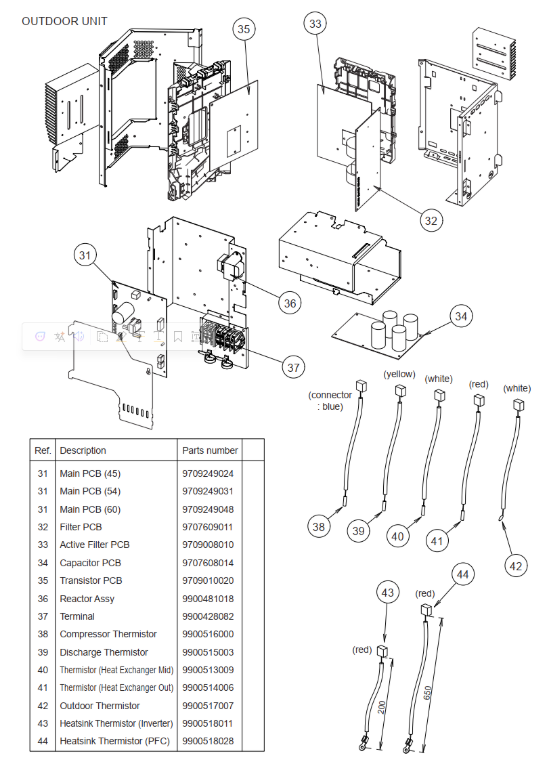
| Ref. | Description | Part number |
|---|---|---|
| 31 | Main PCB (60) | 9709249048 |
| 32 | Filter PCB | 9707609011 |
| 33 | Active Filter PCB | 9709008010 |
| 34 | Capacitor PCB | 9707608014 |
| 35 | Transistor PCB | 9709010020 |
| 36 | Reactor Assy | 9900481018 |
Important: Always confirm the complete unit model before ordering. Do not assume that every part number listed against the same diagram reference is fitted to the unit. Where a bracketed model or capacity designation is shown, select the line applicable to the unit being serviced.