
High Static Ducted Systems - Controlling Multiple Indoor Units from One Controller
1. Applies to
This guidance is intended for compatible GENERAL AIRSTAGE High Static ducted indoor units that use the applicable wired remote-controller connection and support group control.
Current R32 High Static families include:
| Range | Examples |
|---|---|
| High Static Single Phase R32 | ARTH24KHTA, ARTH30KHTA, ARTH36KHTA, ARTH45KHTA, ARTH54KHTA, ARTH60KHTA |
| High Static Single Phase R32 - High Performance | ARTH30KHTA-HP, ARTH36KHTA-HP, ARTH45KHTA-HP, ARTH54KHTA-HP, ARTH60KHTB |
| High Static Three Phase R32 | ARTH36KHTA-3PH, ARTH45KHTA-3PH, ARTH54KHTA-3PH, ARTH60KHTA-3PH |
| Other compatible High Static models | The same principle may apply to other High Static models, including larger-capacity variants such as ARTH72KHTA, where the applicable installation manual confirms group-control support. |
2. How group control works
Group control allows one wired remote controller to operate multiple compatible indoor units as a single group.
Every indoor unit connected to that group receives the same operating command. This is ideal where two or more ducted systems serve the same space or need to operate together.
| Controller command | Indoor unit 1 | Indoor unit 2 |
|---|---|---|
| ON | ON | ON |
| OFF | OFF | OFF |
| Cool / 21°C / High fan | Cool / 21°C / High fan | Cool / 21°C / High fan |
3. Wiring arrangement
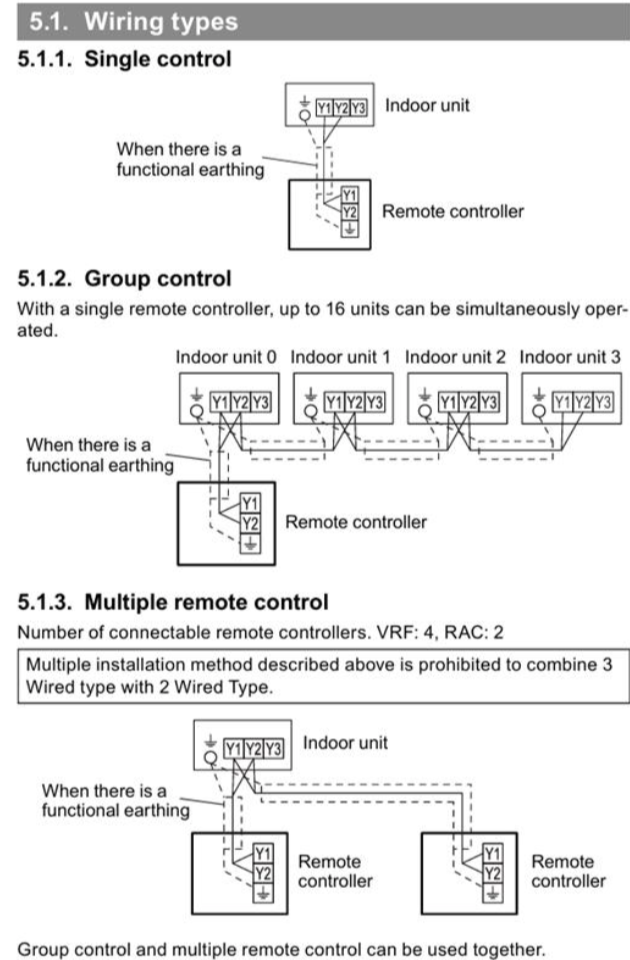
For models using the Y1 / Y2 / Y3 wired remote-controller connection, group control is achieved by connecting the remote-controller circuit across the indoor units as shown in the applicable installation manual under Group Control.
| Connection | Requirement |
|---|---|
| Controller to first indoor unit | Connect to the remote-controller terminals in accordance with the installation manual. |
| First indoor unit to second indoor unit | Link the corresponding remote-controller terminals between the indoor units. |
| Additional indoor units | Continue the group-control wiring in the same manner. Depending on the controller and system, group control can support multiple indoor units. Confirm the permitted quantity in the applicable controller and indoor-unit documentation. |
| Functional earth | Where functional earthing is required, connect it exactly as shown in the applicable installation manual. |
| Wired controller Group controller | → | High Static indoor unit #1 Indoor unit 0 | ↔ | High Static indoor unit #2 Indoor unit 1 |
4. Controller options
The best controller depends on how the customer wants the group to operate. Confirm compatibility with the exact indoor-unit model before selection.
| Controller | Best suited to | Notes |
|---|---|---|
| UTY-RNRT | Straightforward group control | Where supplied and compatible, this is the simplest option when all connected systems only need to operate together. Using the supplied controller can also avoid unnecessary additional controller cost. |
| UTY-RNRYT6 | Group control requiring Lead/Lag | Use where Lead/Lag functionality is required and the controller is compatible with the selected indoor units. |
| KAGAMI UTY-RVRY | Premium installations, showrooms and user-facing spaces | Provides a premium appearance and additional user-management options, including the ability to hide selected functions from the normal user screen and restrict access using the controller PIN. |
5. What if the indoor units need to operate independently?
If the customer wants several indoor units controlled from one location but each unit must retain independent ON/OFF, mode, temperature or fan settings, standard group control is not the correct solution.
In this situation, obtain more information about the installation before selecting the control platform. In particular, confirm:
- How many indoor units are installed?
- Does each indoor unit serve a separate area?
- Is zoning installed or required?
- Is local wall control required as well as centralised/app control?
- Is the requirement residential control, commercial central control or BMS integration?
| Potential solution | When to consider it |
|---|---|
| UTY-ANY2 | Where a compatible Wi-Fi control solution is suitable for the installation. |
| ZoneConnex | Where zoning and centralised control requirements suit the ZoneConnex platform. |
| anywAiR NXT | Where a compatible anywAiR control and zoning solution is required. |
| anywAiR iO | For a more comprehensive, expandable central-control or BMS-style solution. |