
Mobile Technician Pro
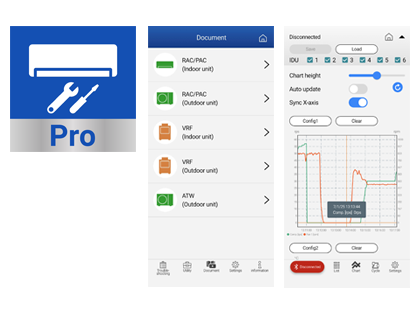
1. Download Mobile Technician Pro
Mobile Technician Pro is available for both Apple iOS/iPadOS and Android devices. Scan the relevant QR code below or select the store button.
2. What Mobile Technician Pro can do
| Function | Benefit to the technician |
|---|---|
| Error code lookup | Quick access to fault information without needing to search through separate service manuals. |
| Troubleshooting guidance | Provides diagnostic charts and service guidance to support a structured fault-finding process. |
| Sensor value checks | Assists with checking system condition, including items such as thermistor resistance and pressure information. |
| Service Monitor - List View | Displays live operating data from a compatible system directly on the smart device. |
| Service Monitor - Graph View | Plots operating data and can display up to three charts, helping technicians identify changes and trends while the system is operating. |
| Refrigeration cycle diagram | Shows operating data in a refrigeration-cycle format, making system behaviour easier to interpret at a glance. |
| Save and reload operating data | Recorded data can be stored on the mobile device and loaded later for review, comparison or escalation. |
The app supports service information for equipment categories including RAC/PAC, VRF, Air to Water (ATW) and Wireless LAN adapters, subject to model and feature compatibility.
3. UTY-ASSXZ1 - AIRSTAGE Service Monitor Tool
UTY-ASSXZ1 is the dedicated Bluetooth Low Energy (BLE) Service Monitor adapter used with the Mobile Technician Pro app. It connects to the compatible outdoor-unit control PCB and transfers operating data wirelessly to the technician's smart device.
Why use UTY-ASSXZ1?
- Wireless service monitoring: Bluetooth connection from the outdoor unit to a smart device.
- No laptop required: simplifies site setup and reduces the amount of diagnostic equipment that needs to be carried.
- Real-time operating data: view temperatures, pressures, compressor operation, valve information and other available system parameters depending on the connected model.
- Graphing: compare operating values over time to identify unstable or abnormal system behaviour.
- Refrigeration cycle view: displays available operating values in a visual refrigeration-cycle diagram.
- Recording Mode: the adapter can retain operating information immediately before an error, which is particularly useful for intermittent faults that may have cleared before the technician arrives.
- Error capture: up to five kinds of error can be saved by the BLE adapter; repeat occurrences of the same error are counted.
- Save and share data: collected data can be saved to the smart device for later review or technical escalation.
- Can be left connected on site: the BLE adapter may be secured inside the outdoor unit where appropriate, allowing data to be captured while investigating intermittent issues.
Connection range
The Bluetooth connection range is approximately up to 10 metres. Obstructions can reduce the effective range, so move the smart device closer if the app reports a weak signal.
4. Basic UTY-ASSXZ1 connection procedure
- Isolate power to the outdoor unit using the isolator or circuit breaker.
- Select the correct UTY-ASSXZ1 control PCB lead for the unit. The kit provides three PA connector types: 6-pin, 10-pin and 12-pin.
- Connect the BLE adapter to the connector labelled FLASH on the compatible outdoor-unit control PCB.
- Reapply power and confirm the BLE adapter LED is operating.
- Open Mobile Technician Pro on the smart device.
- Select the Bluetooth connection function, locate the target BLE adapter and connect.
- When pairing is complete, the app changes to the List screen and live data can be monitored.
5. Safety and handling
- Do not plug or unplug the UTY-ASSXZ1 adapter while the system is powered.
- A live connection can create a risk of electric shock and can damage the adapter or control PCB.
- Keep the adapter and USB connection area clear of moisture, dust, gravel and other small particles.
- Do not allow the USB connection area to contact sheet metal inside the outdoor unit.
6. Practical service benefits
| Traditional service challenge | How Mobile Technician Pro + UTY-ASSXZ1 helps |
|---|---|
| Fault has cleared before attendance | Recording Mode can capture data immediately before an error for later review. |
| Technician needs to understand system behaviour over time | Live graphing makes it easier to compare operating values and identify trends. |
| Laptop setup is inconvenient at the outdoor unit | Bluetooth monitoring allows the technician to work from a phone or tablet. |
| Technical Support needs evidence from site | Operating data can be saved on the mobile device and reviewed later during escalation. |
| Intermittent problem requires monitoring over a longer period | The BLE adapter can be left secured in the outdoor unit where appropriate so fault data can be captured. |
7. Official resources
Mobile Technician Pro - GENERAL Global Apple App Store Google Play