
General Assist Technical Reference
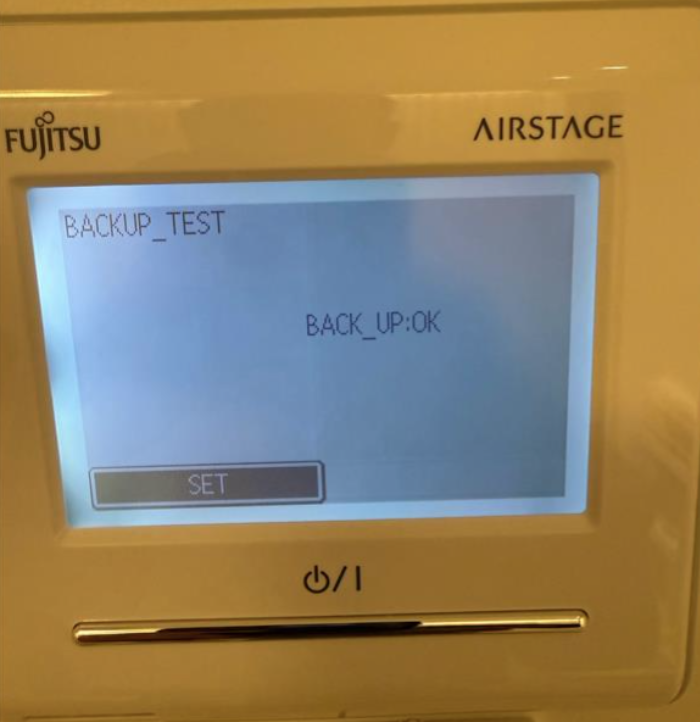
UTY-RNRT - BACKUP_TEST / BACK_UP:OK Screen
What the screen means and how to clear it
Applies to the AIRSTAGE wired remote controller UTY-RVNYN / AR-WDD1E style controller.
If the controller is displaying BACKUP_TEST with BACK_UP:OK, the controller is on its backup-memory test screen. BACK_UP:OK indicates that the backup test has completed successfully; it is not an indoor or outdoor unit fault code.
Screen displayed
| Display | Meaning |
| BACKUP_TEST | The wired controller is in the backup-memory test screen. |
| BACK_UP:OK | The backup test result is OK. |
How to clear the screen
| 1 | Isolate power to the air-conditioning system. Do not open the controller while it is energised. |
| 2 | Remove the wired controller front case and locate the DIP switch on the rear of the front case. |
| 3 | Toggle SW1 - Memory Backup. This is the battery-backup switch. Move the switch to the opposite state to break the backup supply, then return it to the required position. |
| 4 | Reassemble the controller and reset system power. |
| 5 | Allow the controller to restart and confirm that it returns to the normal operating / monitor screen. |
SW1 memory-backup function: On the UTY-RNRT, SW1 controls the controller's memory backup. ON enables battery memory backup and OFF disables it. The documented factory setting is OFF.
If the screen returns
- Confirm SW1 is fully seated in the required ON or OFF position and is not sitting between positions.
- Repeat the power reset after toggling the memory-backup switch.
- Check that the controller starts normally and is communicating with the indoor unit.
- If the controller repeatedly returns to BACKUP_TEST, escalate for further controller diagnosis rather than treating BACK_UP:OK as an air-conditioning fault code.
Service personnel only: The controller installation manual requires power to be isolated before installation or service work. Use an insulated screwdriver when changing the DIP switch and do not alter any DIP switch other than as specified for the application.
Quick reference
| Controller | UTY-RNRT / RNRYT5 style wired remote controller |
| Relevant switch | SW1 - Memory backup |
| SW1 OFF | Memory backup disabled |
| SW1 ON | Memory backup enabled |
| Field clear | Toggle the battery-backup switch and reset power |
Technical reference: UTY-RVNYN wired remote controller installation information - memory backup DIP switch SW1.