Product Information - UTY-NXT anywAiR® Technology Wi-Fi Adaptor II
Print
Modified on: Thu, 16 Jul, 2026 at 4:13 PM
GENERAL AIRSTAGE PRODUCT REFERENCE anywAiR® Technology Wi-Fi Adaptor II Smart climate control using the myanywAiR® Next app | 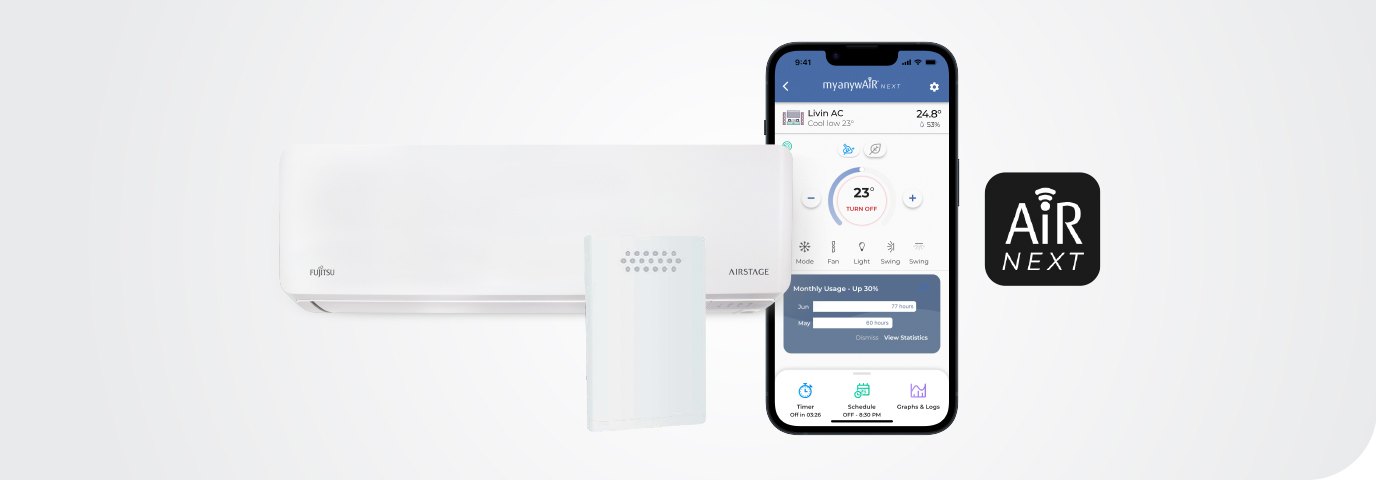 | Experience Smart Climate Control The anywAiR® Technology Wi-Fi Adaptor II connects a compatible GENERAL air conditioner to the myanywAiR® Next app. Users can remotely adjust comfort settings, create schedules, manage operating modes and use supported energy-management features from a smartphone or tablet. Installation requirement: Compatibility depends on the indoor unit having a supported UART connection. A licensed installer and an additional cable may be required for units outside the Lifestyle range. | .png?sfvrsn=67f41e6c_0) |
| 1. Product overview | | Item | Detail | | Product type | External Wi-Fi adaptor for compatible GENERAL air conditioners | | Mobile application | myanywAiR® Next | | Supported devices | Compatible iPhone, iPad, Android phones and Android tablets | | Typical connection | Indoor-unit UART connection using the applicable installation cable | | Voice assistant compatibility | Compatible with selected third-party smart-home voice-control devices | | Warranty | Refer to current GENERAL warranty terms and conditions |
| 2. Main product benefits | Easy to Install
Compact adaptor design for compatible systems. | Voice Assistant-Friendly
Supports selected smart-home ecosystems. | Energy Management
Schedules, timers and automation help manage operation. | Intuitive Mobile App
Simple access to supported controls and settings. | Online Support
Product information, guides and customer support resources. | Smart Comfort
Remote access from home, work or while travelling. |
| 3. myanywAiR® Next key controls | Remote Control Control your compatible GENERAL air conditioner from anywhere using a smartphone or tablet. | Timer Control Set a specific time for the air conditioner to turn on or off. | Schedules Create personalised operating schedules for different days and times. | Climate React Automatically operate the air conditioner when room temperature moves above or below selected limits. | Geofencing Use phone location to switch the system on or off based on proximity to home. | Filter Reminders Receive AI-based reminders to clean the air-conditioner filters. | Device Sharing Share access with family or guests and manage multiple units in one app. | Operating Modes Switch between Cool, Heat, Fan, Dry and Auto modes. | Fan Speed Adjust indoor fan speed remotely. | Louvre Control Control horizontal and vertical louvre swing on supported models. | | |
| 4. myanywAiR® Next PLUS features | PLUS is a paid subscription service that adds advanced monitoring, automation and optimisation functions. | Extended Graphs Review weekly and monthly room temperature, humidity and activity data. | Weather & Air Quality View real-time weather, air quality and relevant alerts. | Auto-Off Failsafe Set a recurring maximum run time so the system turns off automatically. | Coil Dry Run the fan after cooling to help dry residual moisture. | Guest Restrictions Apply temperature and setting restrictions for guest users. | Pure Boost Use supported sensor data and AI to respond to outdoor air quality conditions. | Usage Statistics Review daily, weekly, monthly and yearly usage information. | Energy Optimisation Receive machine-learning alerts and energy-saving suggestions. |
| 5. Downloads and support | | 6. Get the app | Download myanywAiR® Next   |
| 7. Frequently asked questions | Does myanywAiR Next support iPhone and Android?Yes. The app is available for compatible iOS and Android smartphones and tablets. How does phone control work?Once the adaptor is installed and connected to the customer's Wi-Fi network, the app can control temperature, fan speed, operating mode, schedules and supported louvre functions. Can every air conditioner be controlled from a phone?No. The indoor unit must be compatible with the anywAiR Technology Wi-Fi Adaptor II and may require a licensed installer and an additional connection cable. What is myanywAiR Next?It is GENERAL's mobile application for controlling compatible air conditioners, creating schedules, sharing access and using supported energy-management features. | Important: Compatibility, available functions and third-party voice-assistant support may change. Confirm the indoor-unit model, UART connection, required cable and current app requirements before installation. Some controls, including horizontal louvre swing, are only available on selected air conditioners. | | GENERAL AIRSTAGE | anywAiR® Technology Wi-Fi Adaptor II Product Reference |
|
Did you find it helpful?
Yes
No
Send feedback Sorry we couldn't be helpful. Help us improve this article with your feedback.
