
General Assist Technical Reference
VRF Master Indoor Unit Setup
Administrative indoor unit configuration for 2-pipe AIRSTAGE VRF systems
Outdoor unit function setup, wired remote controller configuration and system verification
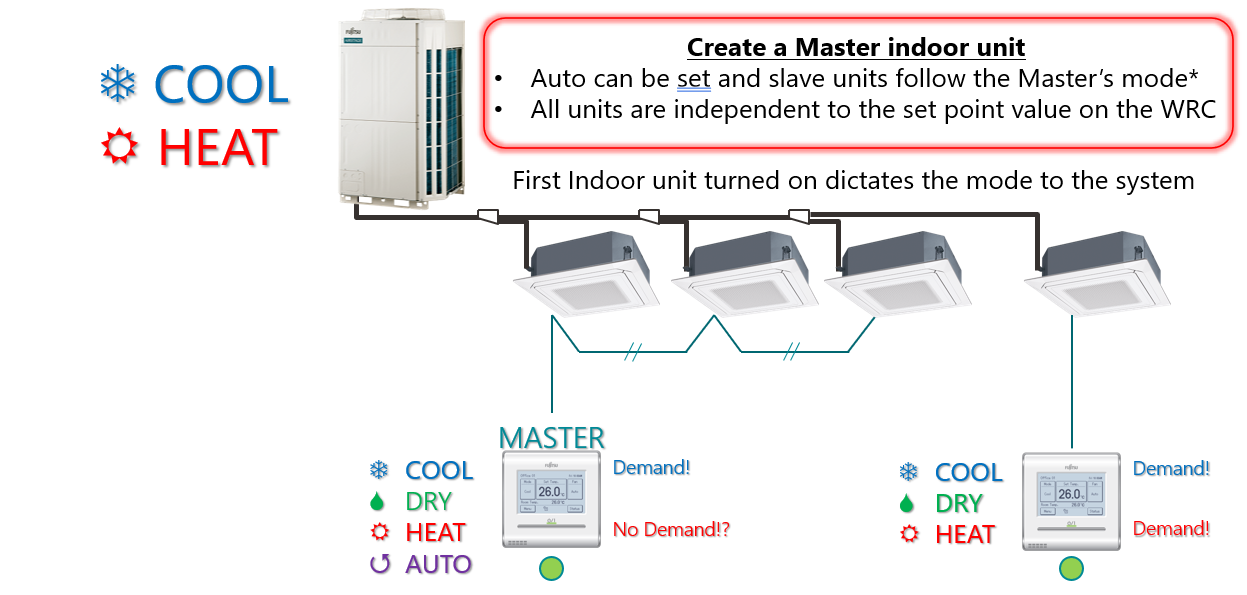
The Administrative Indoor Unit, commonly referred to as the Master Indoor Unit, controls the operating mode for all indoor units connected to the same 2-pipe refrigerant system. Each indoor unit can still maintain its own temperature setpoint.
Important: Only one Master Indoor Unit may be configured per refrigerant system. Complete system addressing before carrying out this procedure.
1. Purpose
The Administrative Indoor Unit, commonly referred to as the Master Indoor Unit, controls the operating mode - Cool, Heat or Auto - for all connected indoor units in a 2-pipe system.
- All slave indoor units follow the operating mode selected by the Master.
- Each indoor unit can maintain an independent temperature setpoint.
- The first indoor unit powered on may dictate the initial Cool or Heat mode until a Master is configured.
- Master setup must be completed before commissioning.
2. Preparation
- Verify all indoor units and the outdoor unit are powered on.
- Confirm system addressing has been completed, either manually or automatically.
- Confirm the communication wiring X1 / X2 is correctly installed and polarity is maintained.
- Confirm there are no active outdoor unit errors. LED101 should be illuminated green and LED102 should be off.
3. Enable Administrative Control at the Outdoor Unit
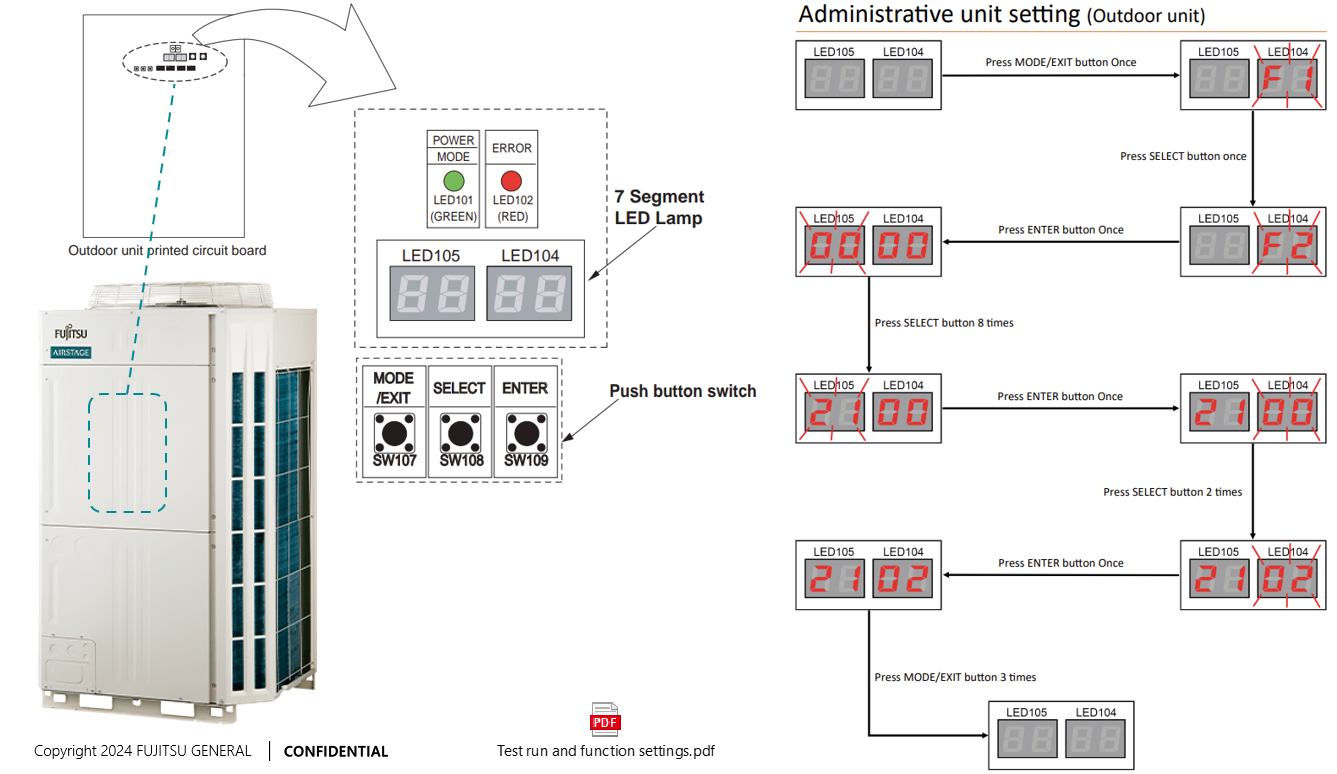
Use the outdoor unit PCB push buttons to enable Function F2-21-02.
| Step | Action | Display |
|---|---|---|
| 1 | Press MODE/EXIT (SW107) once | F1 |
| 2 | Press SELECT (SW108) once | F2 |
| 3 | Press ENTER (SW109) once | 00 00 |
| 4 | Press SELECT (SW108) eight times | 21 00 |
| 5 | Press ENTER (SW109) once | 21 00 confirmed |
| 6 | Press SELECT (SW108) twice | 21 02 |
| 7 | Press ENTER (SW109) once | 21 02 confirmed |
| 8 | Press MODE/EXIT (SW107) three times | Display clears and the function is saved |
Function result: F2-21-02 enables Administrative Indoor Unit operation for the connected refrigerant system.
4. Set the Master Indoor Unit on the Wired Remote Controller
Use the touch-screen Wired Remote Controller connected to the indoor unit that will become the Master.
- From the Monitor screen, press Menu.
- On Main Menu Page 1, select Next Page.
- On Main Menu Page 2, select Initial Setting.
- On Initial Setting Page 1, press Next Page.
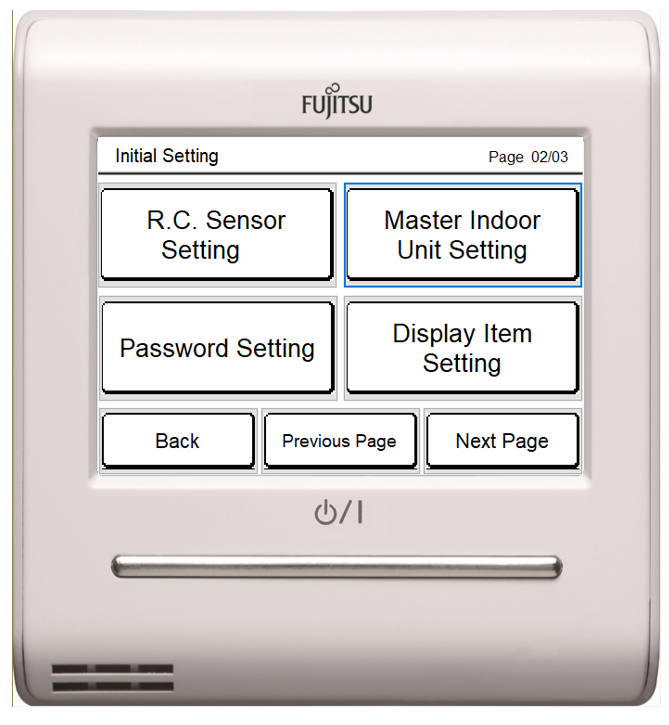
- On Initial Setting Page 2, select Master Indoor Unit Setting.
- Enter the installer password. The factory default is
0000. If the password has been changed, enter the current installer password. - When the screen shows Not Master Indoor Unit, press Set.
- At the confirmation prompt, press Yes.
The connected indoor unit is now registered as the system's Master Indoor Unit.
5. Verification
- The Master controller should display a Master indicator.
- Slave units should follow the Master's Cool, Heat or Auto mode.
- Each slave unit should retain its own temperature setpoint.
- Only one Master should be configured for each refrigerant system.
6. Notes for 2-Pipe Systems
- All indoor units on the same outdoor circuit follow the Master's operating mode.
- Cool-to-Heat or Heat-to-Cool changes must be initiated from the Master unit.
- A slave attempting to select the opposite mode may display Operation restricted by Master.
7. Optional RB Unit Priority Settings
For systems with multiple indoor units connected through an RB unit, DIP switch SET2 controls operating-mode priority and Cool/Heat control time.
| Setting | DIP Switch Position | Result |
|---|---|---|
| Factory mode priority | SET2-1 OFF, SET2-2 OFF | Priority to first command |
| Administrative IU priority | SET2-1 OFF, SET2-2 ON | Priority to Administrative Indoor Unit |
| Factory Cool/Heat control time | SET2-3 OFF, SET2-4 OFF | 6-minute control time |
8. Final Confirmation
- Turn on the Master indoor unit.
- Confirm the system enters the selected Cool or Heat mode.
- Verify all slave units respond in the same operating mode.
- Record the Master indoor unit address and remote controller ID in the commissioning documentation.
9. Troubleshooting
| Symptom | Possible Cause | Corrective Action |
|---|---|---|
| Cannot select Master | Outdoor function F2-21-02 is not enabled | Complete the outdoor unit function setup |
| Master not recognized | System addressing is incomplete | Re-address indoor units and repeat verification |
| Slave units do not follow the Master | Communication wiring fault or duplicate Masters | Check X1/X2 wiring and confirm only one Master is assigned |
| Installer password rejected | The factory password has been changed | Confirm the current installer password with the system administrator |
Setup sequence: Enable F2-21-02 at the outdoor unit, nominate the Master using the touch-screen wired remote controller, then confirm mode synchronisation across the refrigerant system.