
General Assist Technical Reference
Highwall Manual / Auto Button
Start/stop, Auto 23 °C and Forced Cooling operation
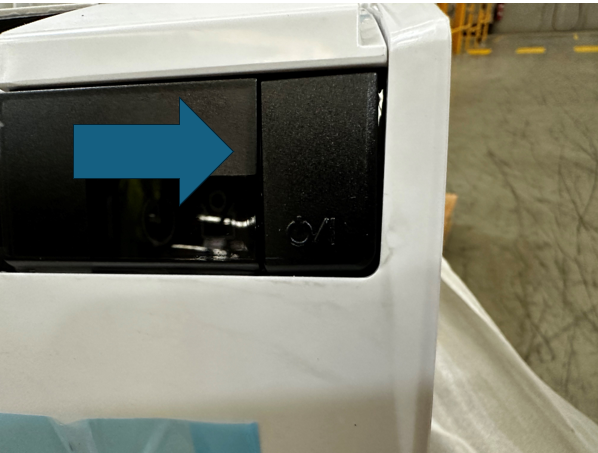
For Fujitsu / AIRSTAGE highwall indoor units fitted with a MANUAL/AUTO or ON/OFF button
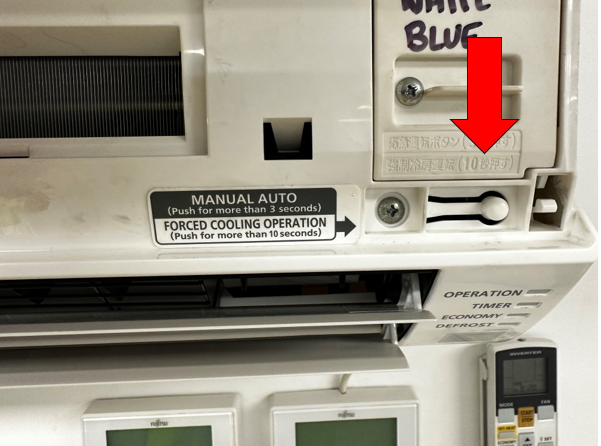
Most highwall indoor units include a manual/auto button behind the front fascia. Depending on how long the button is pressed, it can start or stop the unit, operate a basic Auto program at approximately 23 °C, or enter Forced Cooling for service and commissioning.
1. Where to find the button
- Open the front panel by lifting it from the bottom edge.
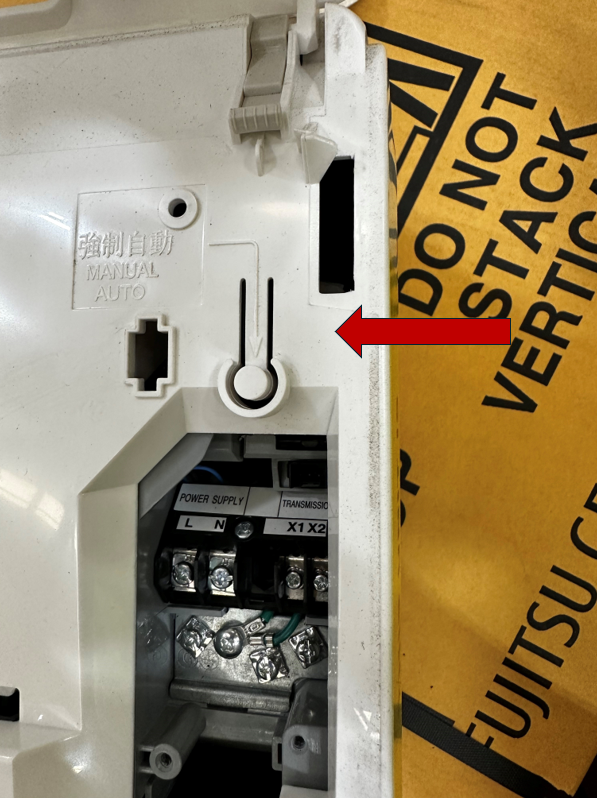
- Look along the right-hand side of the display or PCB area for a small MANUAL/AUTO or ON/OFF push button.
- On some models the button is recessed and may require a pen tip or similar blunt object to operate.
2. Button functions
| Press duration | Function | What happens |
|---|---|---|
| Short press / tap | Start / Stop | Starts or stops normal unit operation. |
| 2-4 seconds | Auto at 23 °C | If room temperature is above 23 °C the unit cools. If below 23 °C the unit heats. |
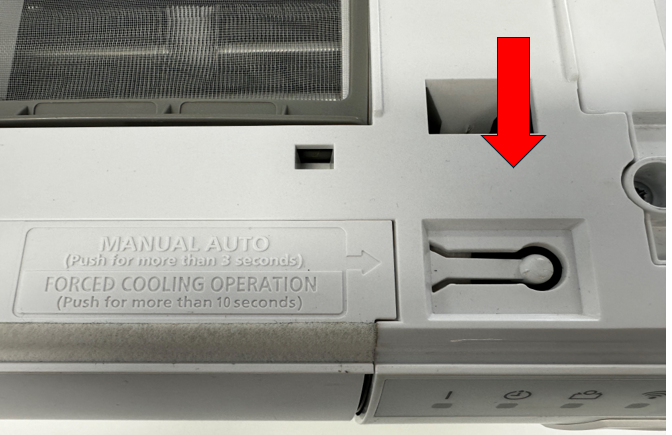
| 10 seconds or longer | Forced Cooling | Runs forced cooling for service/testing and ignores normal room-temperature control. |
3. Forced Cooling
Service use only: Forced Cooling is intended for testing and commissioning. Do not leave the unit operating unattended in this mode. Extended operation in a cool space may increase the risk of indoor-coil icing or condensate carry-over.
- Press and hold the manual/auto button for 10 seconds or longer.
- The unit enters Forced Cooling and normal room-temperature control is overridden.
- The indoor fan and compressor will generally ramp toward a high cooling output and the louvers will move to a normal cooling position.
- Avoid using Forced Cooling at low outdoor ambient temperatures.
How to exit Forced Cooling
- Press the manual/auto button again to stop the unit.
- Power-cycle the indoor unit.
- Send a command from the remote controller, if available.
4. Auto 23 °C fallback operation
Holding the button for approximately 2-4 seconds provides a simple fallback Auto mode when a remote controller is not available.
| Room condition | Expected operation |
|---|---|
| Room temperature above 23 °C | Cooling |
| Room temperature below 23 °C | Heating |
Important: Auto 23 °C is a basic fallback mode. It does not reproduce custom schedules, timers, setpoints or special operating modes normally selected from the remote controller.
5. Indications during operation
- The Operation lamp illuminates when the unit is running and may flash briefly during start-up.
- During Forced Cooling, the indoor fan and compressor generally operate at a high output.
- Lamp behaviour varies by model. Persistent flashing should be treated as a possible fault indication rather than normal manual/auto operation.
6. If the unit does not start
| Check | Action |
|---|---|
| Power supply | Confirm mains power, isolator and fuse/circuit protection. |
| Front panel | Ensure the panel is properly closed where the model uses a panel interlock. |
| Error indication | Check Operation/Timer lamp flash patterns for an active error code. |
| Central control | If a wired controller or BMS is fitted, local manual operation may be restricted or disabled. |
7. Return to normal operation
Once a remote controller is available, send a normal command such as Power OFF followed by Power ON. The system can then be returned to the required mode, setpoint and fan setting.
Model variation: Button location, press duration and available manual functions can vary between indoor-unit models. Where the behaviour differs from this guide, refer to the operating or service manual for the specific model.