
anywAiR Controller Guide
Setting the timer on the anywAiR ducted controller (UTY-ANY1 and UTY-ANY2)
How to set, review and clear the Simple Timer on the anywAiR ducted controller touch pad.
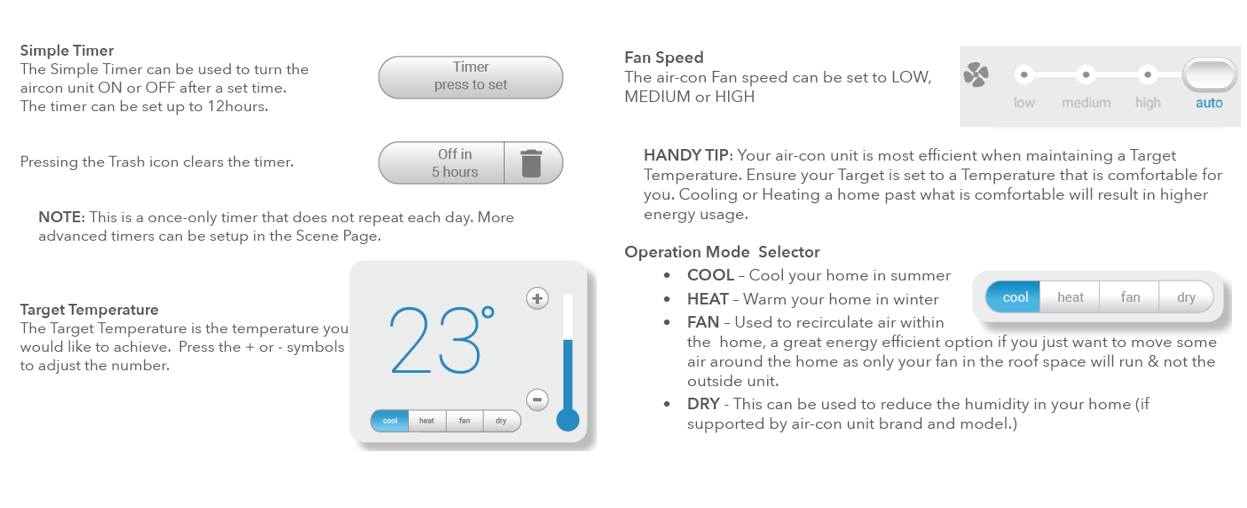
Simple Timer: The timer can be used to turn the air conditioner ON or OFF after a selected period of time, up to a maximum of 12 hours.
How to set the timer
| 1 | Open the Mode screen on the anywAiR touch pad. |
| 2 | Press the Timer - press to set button. |
| 3 | Select the required timer period. The Simple Timer can be set for up to 12 hours. |
| 4 | Once set, the timer button will display the remaining period, for example "Off in 5 hours". |
Clearing the timer
To cancel a timer that has already been set, press the trash/bin icon shown beside the active timer.
Important: The Simple Timer is a one-time timer. It does not automatically repeat each day.
Need a repeating schedule?
For more advanced or repeating timer functions, use the Scene page on the anywAiR controller.
Related controls on the Mode screen
| Control | Function |
|---|---|
| Target temperature | Use the + or - controls to adjust the desired room temperature. |
| Fan speed | Select Low, Medium or High fan speed. |
| Cool | Cooling operation. |
| Heat | Heating operation. |
| Fan | Recirculates air without operating the outdoor unit. |
| Dry | Can be used to reduce humidity where supported by the air-conditioning system. |
Applicable controller: UTY-ANY1 anywAiR ducted controller touch pad.