
AnyWair Ducted Controller (UTY-ANY1 and UTY-ANY2) – Main Screen Layout
Main Mode screen functions and controls
Reference for the primary operating screen on the AnyWair ducted zone controller
The Mode screen is the main operating screen of the AnyWair UTY-ANY1 ducted controller. From this screen you can turn the air conditioner on or off, set the operating mode, adjust temperature, select fan speed and configure the timer.
1. Main Screen Layout
The Mode screen provides the main controls required for normal operation of the air-conditioning system.
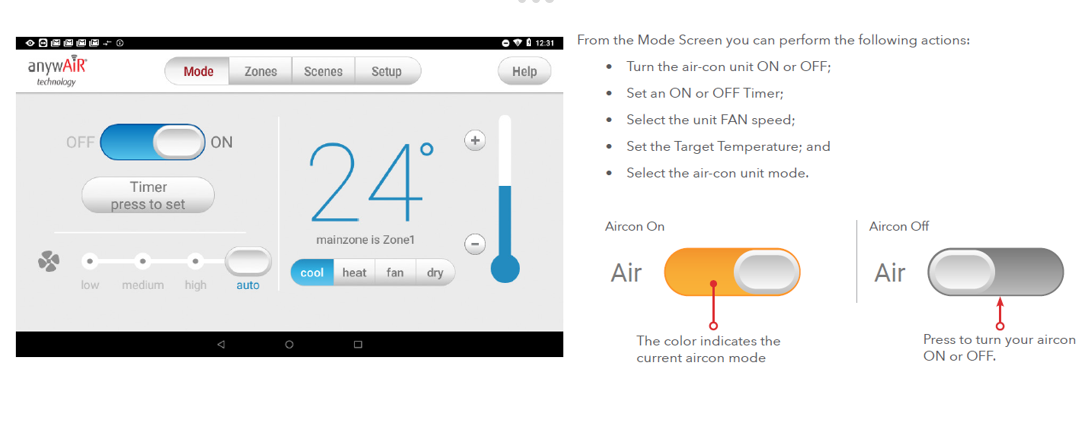
2. What Can Be Controlled from the Mode Screen?
| Function | Description |
|---|---|
| Air Conditioner ON / OFF | Turns the connected air-conditioning system on or off. |
| ON / OFF Timer | Allows a timer to be set for the air conditioner. |
| Fan Speed | Selects the indoor unit fan speed. |
| Target Temperature | Adjusts the required air-conditioning set temperature. |
| Operating Mode | Selects the required air-conditioning mode. |
3. Turning the Air Conditioner ON or OFF
The air-conditioner power control is shown on the left side of the Mode screen.
| Air Conditioner ON | The switch is moved to the ON position and the colour indicates the current operating state. |
| Air Conditioner OFF | Press the switch to turn the air conditioner off. |
Operating indication: The colour of the ON/OFF control indicates the current air-conditioning operating mode/state.
4. Setting the Target Temperature
The target temperature is shown prominently in the centre of the Mode screen.
Use the + and − controls beside the temperature display to increase or decrease the set temperature.
Example Display
24°C
Current target temperature
5. Selecting Fan Speed
The fan-speed control is positioned on the lower-left section of the Mode screen.
The available selections shown are:
- Low
- Medium
- High
- Auto
6. Selecting the Operating Mode
The operating mode can be selected from the controls beneath the temperature display.
The modes shown on the controller are:
| Cool | Cooling operation |
| Heat | Heating operation |
| Fan | Fan-only operation |
| Dry | Dehumidification operation |
7. Main Navigation Tabs
The top of the controller display provides access to the primary AnyWair control areas.
| Tab | Purpose |
|---|---|
| Mode | Main air-conditioning control screen. |
| Zones | Accesses zone control. |
| Scenes | Accesses programmed scene functions. |
| Setup | Accesses controller setup and configuration options. |
| Help | Provides access to controller help information. |
8. Quick Reference
| Control | Location / Function |
|---|---|
| ON / OFF | Left side of Mode screen |
| Timer | Below the ON/OFF control |
| Fan Speed | Lower-left section |
| Target Temperature | Centre of screen |
| Operating Mode | Below target temperature |
| Main Navigation | Mode / Zones / Scenes / Setup / Help |
Note: Available operating modes and functions may depend on the connected air-conditioning system and controller configuration.