
ARTG24LMLC Compatibility and Serial Number Requirements
For connection to AOTG36LBLA5 and AOTG45LBLA6 multi outdoor units
Important: An ARTG24LMLC indoor unit must have the compatible serial number and PCB software revision before it is connected to an AOTG36LBLA5 or AOTG45LBLA6 multi system. An incompatible indoor unit may generate error code 0023.
1. Applies To
| Equipment | Applicable model |
|---|---|
| Indoor unit | ARTG24LMLC |
| Multi outdoor units | AOTG36LBLA5 and AOTG45LBLA6 |
2. Issue
When an ARTG24LMLC indoor unit is connected to an AOTG36LBLA5 or AOTG45LBLA6 multi outdoor system, error code 0023 may occur when the indoor unit uses an earlier control PCB and software revision.
The serial number format provides a quick method of identifying whether the indoor unit is suitable for this multi-system configuration.
3. Root Cause
Earlier and later production ARTG24LMLC indoor units use different control PCB software coding.
| Serial number | Software status | Multi-system compatibility |
|---|---|---|
| R0xxxxxx | Earlier firmware | Not compatible with AOTG36LBLA5 or AOTG45LBLA6. |
| R1xxxxxx | Revised firmware | Compatible with the applicable multi outdoor units. |
4. Compatibility Requirements
An ARTG24LMLC with an R0xxxxxx serial number must not be used with the applicable multi outdoor units, even if the model number is otherwise correct.
5. Identification
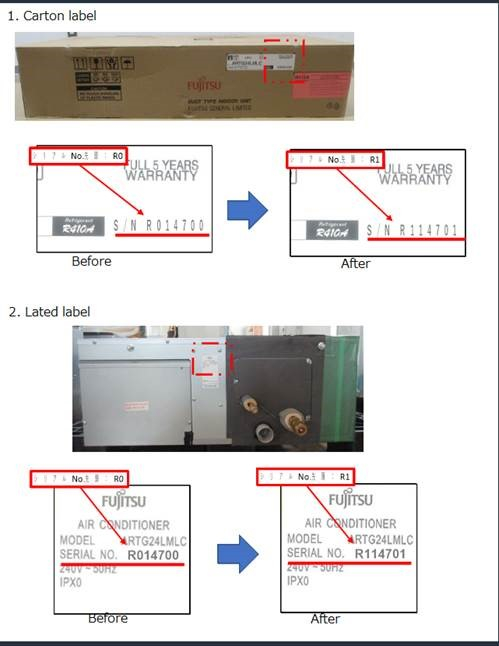
Check the serial number before installation or commissioning. The updated serial number sequence is shown on both:
- The carton label
- The indoor unit rating label
| Identification | Result |
|---|---|
| Before: R0xxxxxx | Earlier software revision. Do not use in this multi configuration. |
| After: R1xxxxxx | Updated software revision. Suitable for the applicable multi configuration. |
6. Pre-Installation Check
| 1 | Confirm the indoor unit model is ARTG24LMLC. |
| 2 | Confirm the outdoor unit is AOTG36LBLA5 or AOTG45LBLA6. |
| 3 | Check that the indoor unit serial number begins with R1. |
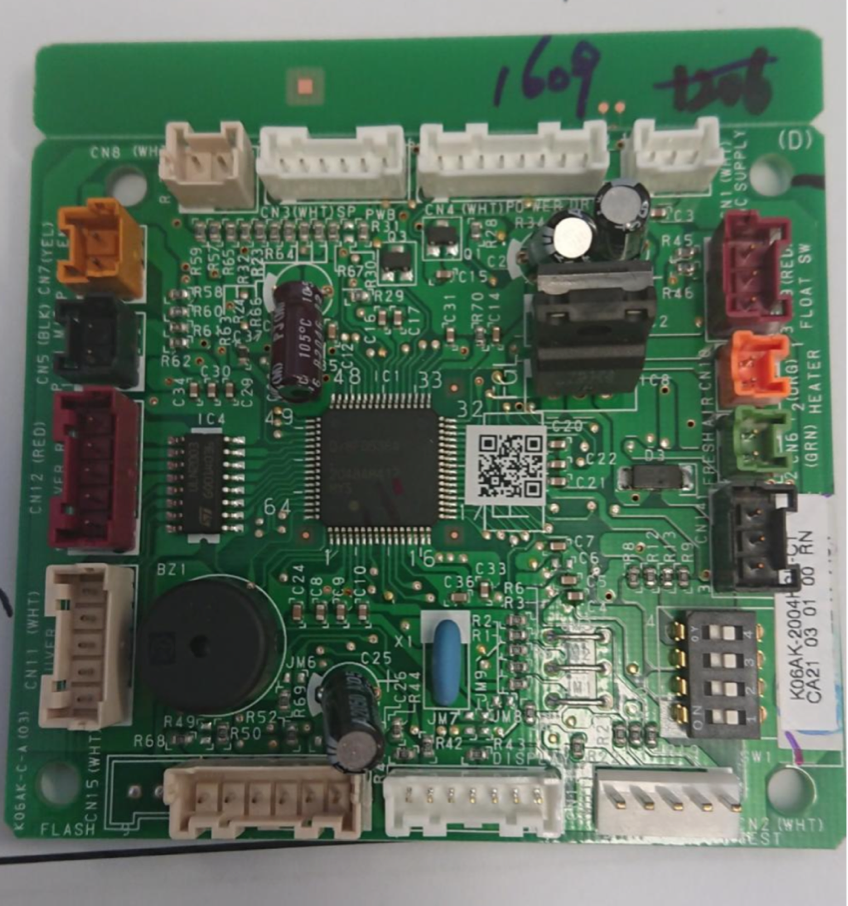
| 4 | Where PCB confirmation is required, verify software code A28 or the new PCB sticker marked 2004. |
| 5 | Complete system commissioning and confirm that error code 0023 is not present. |
7. Outcome
Using an ARTG24LMLC indoor unit with an R1xxxxxx serial number and the revised A28 software ensures communication compatibility with AOTG36LBLA5 and AOTG45LBLA6 multi outdoor systems and prevents error code 0023 associated with the earlier PCB software revision.
8. Quick Reference
| Check | Requirement |
|---|---|
| Indoor model | ARTG24LMLC |
| Outdoor model | AOTG36LBLA5 or AOTG45LBLA6 |
| Compatible serial number | R1xxxxxx |
| Incompatible serial number | R0xxxxxx |
| Required software | A28 |
| New PCB sticker | 2004 |
| Associated fault | Error code 0023 |