
Freshdesk-safe version: All formatting is inline. Paste this code into the Freshdesk HTML/source editor rather than the standard visual editor.
General Air Conditioning | Customer Support Guide
What is myanywAiR WiFi?
Remote control and smart connectivity for compatible General air conditioners and heat pumps
At a glance: myanywAiR is a Wi-Fi-enabled control solution that allows compatible General air conditioners and heat pumps to be operated remotely from a smartphone or tablet.
1. What is myanywAiR?
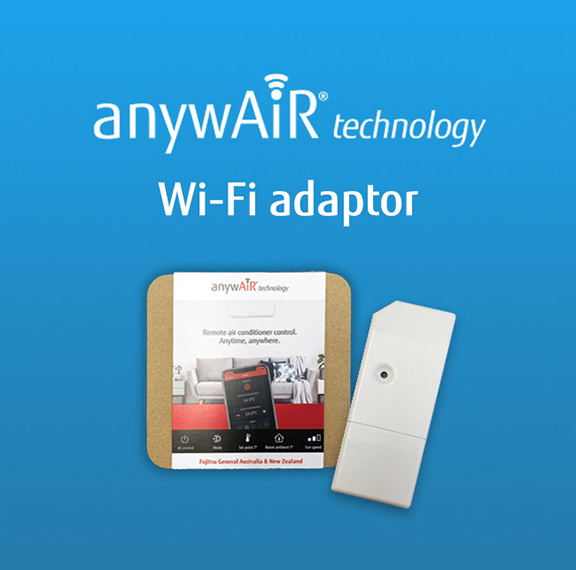
myanywAiR is a Wi-Fi control platform for compatible General air conditioners and heat pumps. It generally consists of two components:
| Component | Purpose |
|---|---|
| anywAiR WiFi device or adaptor | Connects the compatible indoor unit to the customer’s Wi-Fi network. |
| myanywAiR mobile application | Allows the customer to operate and monitor the system from a compatible iOS or Android device. |
Important: Available functions depend on the air conditioner model, Wi-Fi device, app version, installation arrangement and region. Not every feature is available on every system.
2. Key features
| Function | What it allows the customer to do |
|---|---|
| Remote On/Off | Start or stop the air conditioner while away from the property. |
| Mode control | Select supported modes such as cooling, heating, fan, dry or auto. |
| Temperature control | Adjust the set temperature remotely. |
| Fan control | Change the fan speed where the indoor unit supports this function. |
| Room monitoring | View available room or ambient temperature information. |
| Timers and scenes | Create schedules or preset actions, such as starting the system before arriving home. |
| Voice-assistant integration | Connect with supported smart-home platforms where available. |
3. Customer benefits
Convenience
Customers can manage comfort without being in front of the wall controller or handheld remote.
Customers can manage comfort without being in front of the wall controller or handheld remote.
Comfort planning
Schedules and scenes can prepare the home before the customer arrives or wakes up.
Schedules and scenes can prepare the home before the customer arrives or wakes up.
Improved accessibility
The app may provide a more convenient control option for customers who find physical remotes difficult to use or locate.
The app may provide a more convenient control option for customers who find physical remotes difficult to use or locate.
Energy-management support
Remote access can help customers avoid leaving the system running unnecessarily, although actual energy use still depends on operating conditions and user behaviour.
Remote access can help customers avoid leaving the system running unnecessarily, although actual energy use still depends on operating conditions and user behaviour.
4. Compatibility
Compatibility must be confirmed before supplying or installing a Wi-Fi device. The following information should be checked:
| Check | Requirement |
|---|---|
| Indoor unit model | Confirm the exact indoor model appears on the current compatibility list. |
| Wi-Fi adaptor type | Use only the approved device or adaptor specified for that indoor model. |
| Connection method | Some units use a USB-style connection, while others require a dedicated interface or wiring adaptor. |
| App and region | Confirm the supported application and functions for the customer’s market. |
| Existing controller | Check for any controller or accessory combinations that may affect compatibility. |
Do not rely on unit age alone. Some older systems may be compatible, while some models may require a different interface or may not support Wi-Fi control. Always verify the complete indoor unit model.
5. Installation and network requirements
- Confirm the indoor unit and Wi-Fi device are compatible.
- Install the Wi-Fi adaptor using the model-specific installation instructions.
- Download the correct myanywAiR application to the customer’s smartphone or tablet.
- Connect the mobile device to the customer’s supported home Wi-Fi network.
- Pair the Wi-Fi device with the app and complete account or device registration where required.
- Test remote On/Off, mode, set temperature and any supported schedules before leaving site.
Network guidance: Many HVAC Wi-Fi products require a 2.4 GHz wireless network during setup. The Wi-Fi signal must be strong and stable at the indoor unit location.
6. Common setup issues
| Issue | Checks |
|---|---|
| Device will not pair | Confirm 2.4 GHz Wi-Fi, correct password, app permissions, pairing mode and proximity to the router. |
| Unit shows offline | Check router operation, internet access, signal strength, adaptor power and whether the network credentials have changed. |
| Some functions are unavailable | Confirm the function is supported by the indoor unit, adaptor and app version. |
| Voice control does not work | Confirm regional support, account linking, device naming and compatible smart-home platform settings. |
| Intermittent connection | Assess Wi-Fi coverage, router distance, network congestion and local interference. |
7. Service and customer-support considerations
- Pre-check compatibility: Confirm the complete indoor unit model before quoting or supplying an adaptor.
- Installation package: Consider including adaptor installation, app pairing and a customer walkthrough.
- Customer ownership: The customer should retain control of their app account, email address and password.
- Network responsibility: Router configuration, internet availability and Wi-Fi coverage are generally outside the air conditioner’s operation.
- Privacy: Do not request or retain customer passwords in service notes. Record only the technical outcome and any relevant device status.
- Model-dependent capability: Avoid promising features until compatibility and supported functions have been confirmed.
8. Summary
myanywAiR provides remote control and smart connectivity for compatible General air conditioners.
It can improve customer convenience through remote On/Off, temperature adjustment, mode control, schedules and selected smart-home functions. Compatibility, connection method and available features must always be confirmed against the exact indoor unit and approved Wi-Fi device before installation.
It can improve customer convenience through remote On/Off, temperature adjustment, mode control, schedules and selected smart-home functions. Compatibility, connection method and available features must always be confirmed against the exact indoor unit and approved Wi-Fi device before installation.
Service reminder: When troubleshooting a Wi-Fi concern, first separate air conditioner operation from network operation. Confirm the unit works normally from its local controller before diagnosing the router, app or Wi-Fi adaptor.