
General Assist Technical Reference
Fujitsu AnywAir IR Blaster - IS-IR-WIFI-FG
Manual button operation
The AnywAir IR Blaster includes a MANUAL button that can be used to send a preset operating command to the connected air conditioner.
Manual button operation
Press and hold the MANUAL button on the AnywAir IR Blaster for approximately 1 second.
The IR Blaster will send the following command to the air conditioner:
| Setting | Command |
|---|---|
| Operating mode | COOL |
| Fan speed | HIGH |
| Set temperature | 25°C |
Note: The MANUAL button sends a fixed preset command. It does not use the current settings in the AnywAir application.
Reference image
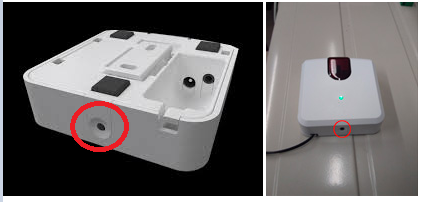
Quick reference: MANUAL button for 1 second = COOL / HIGH FAN / 25°C.
When pushing the MANUAL button on the Anywair IR Blaster for one second, it will set the unit to COOL, HIGH FAN and 25 degrees.