
General Air Conditioning | Technical Support
Remote Controller Function Settings
Operation Mode Exemption / Mode Prohibition
How to hide selected operating modes from the wired remote controller menu
Timing requirement: Complete the entry procedure within 3 minutes of turning on the power to the controller and indoor unit.
Purpose: Operation Mode Exemption removes selected modes from the wired controller's operation menu. It does not disable those modes at the indoor unit itself.
1. Overview
The wired remote controller includes a service-level function that allows selected operating modes to be hidden from the normal user menu. This is useful where the site requires restricted operation, such as cooling-only or heating-only use.
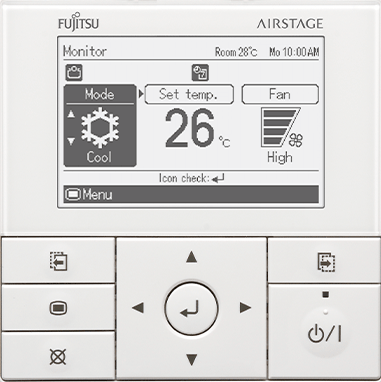
| Setting | Effect |
|---|---|
| Mode available | The mode remains visible and can be selected by the user. |
| Mode exempted | The mode is removed from the wired controller's operation-mode menu. |
Important: This setting only changes what can be selected from the controller. It does not remove the operating mode from the indoor unit's internal capability.
2. Enter the Remote Controller Function Setting
Step 1 - Turn the power on
Turn on the power supply and begin the following procedure within 3 minutes.
Step 2 - Open the Service screen
From the controller menu, enter the following path:
Menu / Submenu → Service
Step 3 - Enter the hidden function-setting mode
Simultaneously press and hold the following three buttons for 5 seconds:
| Screen switch button (left) | Enter button | Cursor button (down) |
Button-pressure note: The command may not register if the buttons are pressed too firmly. Apply normal, even pressure to all three buttons at the same time.
Step 4 - Open R.C. Function Setting
From the Function Setting screen, select:
R.C. function setting → Operation mode exemption
3. Select the Modes to Exempt
On the Operation Mode Exemption screen, review each mode and select the modes that must be removed from the normal controller menu.
| Mode | Typical purpose |
|---|---|
| Cool | Cooling operation |
| Dry | Dehumidification operation |
| Fan | Air circulation without active heating or cooling |
| Heat | Heating operation |
| Auto | Automatic heating or cooling selection |
To save the setting: Select the required exemption status for each mode, then press OK / Enter to confirm.
4. Dual Remote Controller Systems
Primary and secondary controllers must match: Where two wired controllers are connected, apply the same Operation Mode Exemption settings to both controllers. Settings entered on the primary controller are not automatically transferred to the secondary controller.
5. Final Checks
| Check | Requirement |
|---|---|
| 1 | Return to the normal operation screen. |
| 2 | Confirm the exempted modes are no longer displayed in the operation-mode menu. |
| 3 | Operate the system in a mode that has not been exempted. |
| 4 | Confirm the indoor unit starts, runs, and responds normally. |
Memory behaviour: The indoor unit memorises the last operating mode. It is not necessary to overwrite the memorised operating mode after changing the exemption settings.
6. Quick Reference
Menu path
Service → Function setting → R.C. function setting → Operation mode exemption
Hidden-entry button sequence
Screen switch (left) + Enter + Cursor down — hold together for 5 seconds