
Freshdesk-safe version: Paste this code into the Freshdesk HTML/source editor.
General Assist Customer Support
Human Sensor Energy-Saving Function
How to activate, deactivate and understand occupancy detection
Applicable to selected Fujitsu General and General wall-mounted air conditioners
The Human Sensor is an infrared occupancy-detection feature designed to reduce unnecessary energy use when no one is detected in the room. It monitors movement and body heat within its detection area and automatically adjusts the set temperature after the room has been unoccupied for a period.
Model-dependent feature: Human Sensor operation, button names and indicator displays can vary between models. Confirm the indoor-unit operating manual where available.
1. Activating and deactivating the Human Sensor
| 1 | Press the SENSOR button on the wireless remote controller. |
| 2 | The ENERGY SAVING indicator will flash or appear on the remote-controller display, confirming that the function is active. |
| 3 | To deactivate the function, press the SENSOR button again. |
| 4 | The ENERGY SAVING indicator will disappear from the display. |
If the remote controller does not have a SENSOR button, the indoor unit may not support this feature or may use a different control method.
2. How the energy-saving operation works
If no person is detected in the room for approximately 20 minutes, the system automatically adjusts the temperature to reduce energy consumption. When someone returns, the Human Sensor detects movement and returns the air conditioner to its original settings.
| Operating mode | When no person is detected |
|---|---|
| COOL / DRY | The set temperature may increase by up to approximately 2°C. |
| HEAT | The set temperature may decrease by up to approximately 4°C. |
| AUTO | The system automatically applies the appropriate cooling, heating or drying energy-saving adjustment. |
When used with the SLEEP timer, the SLEEP timer generally takes priority. During 10°C HEAT operation, the set temperature may not be changed by the Human Sensor.
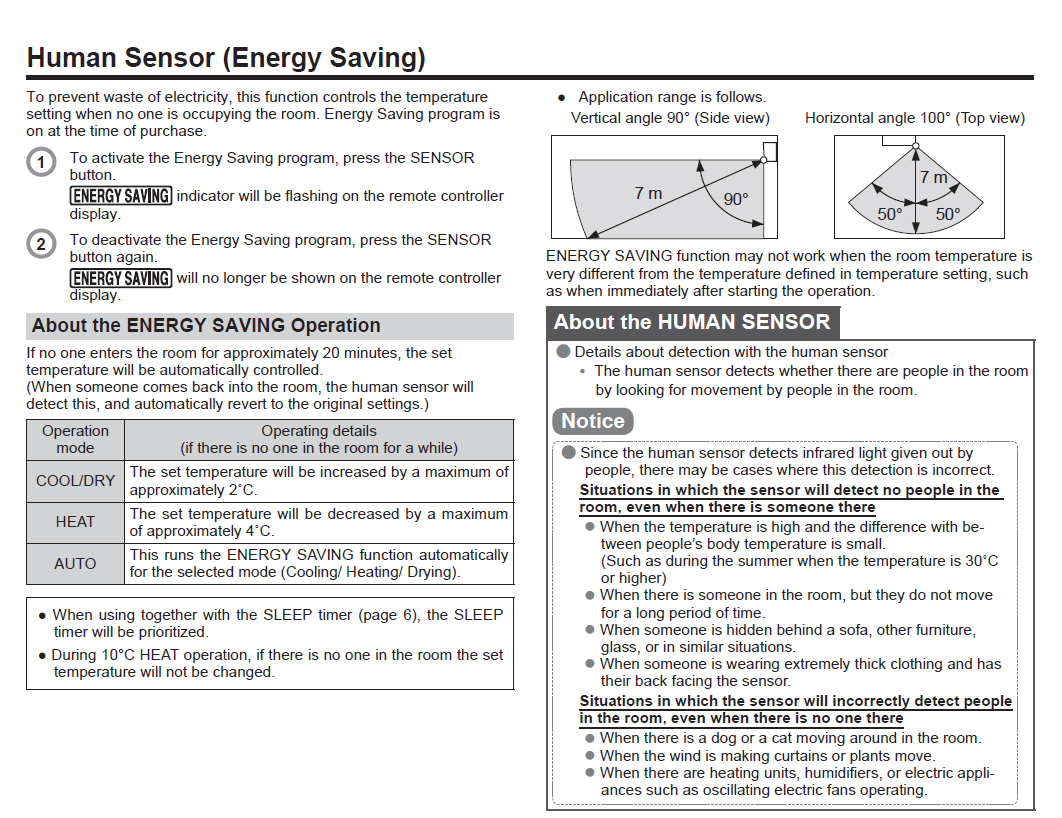
3. Detection area
| Detection characteristic | Approximate range |
|---|---|
| Distance | Up to approximately 7 m |
| Vertical angle | Approximately 90° |
| Horizontal angle | Approximately 100° total, around 50° each side |
The sensor detects people by sensing movement and infrared heat. It does not identify a person visually and cannot reliably detect someone who remains completely still.
4. Situations where a person may not be detected
| ! | The room temperature is high and there is little temperature difference between a person and the surroundings. |
| ! | A person remains still for a long period. |
| ! | A person is hidden behind furniture, glass or another obstruction. |
| ! | A person is wearing very thick clothing and has their back facing the sensor. |
5. Situations where occupancy may be detected incorrectly
| • | A dog, cat or other moving animal is in the room. |
| • | Curtains, blinds or plants are moving in the airflow. |
| • | A heater, oscillating fan or other appliance creates moving heat patterns. |
| • | Direct sunlight or rapidly changing thermal conditions affect the sensor area. |
6. Improving sensor performance
| 1 | Keep the sensor area clear of tall furniture, curtains and large objects. |
| 2 | Avoid positioning heaters, oscillating fans or moving plants directly in the detection zone. |
| 3 | Keep the sensor lens clean and do not cover it. |
| 4 | Allow several minutes after startup for room temperatures and sensor operation to stabilise. |
The Human Sensor is an energy-saving aid and is not a security, occupancy-counting or safety device. It should not be relied upon to confirm whether a room is occupied.
7. When further assistance is required
Further assistance may be required when:
- The ENERGY SAVING indicator does not appear when the SENSOR button is pressed.
- The sensor lens is damaged or missing.
- The unit constantly changes temperature despite normal room occupancy.
- The sensor does not detect movement within the stated detection area.
- The remote controller does not include a SENSOR button and feature availability is uncertain.
This article is based on the supplied Human Sensor operating instructions. Detection range, temperature adjustment and control behaviour may vary between models. Refer to the operating manual for the exact indoor-unit model where available.