
General Assist Customer Support
Operating a Wall-Mounted Air Conditioner Without the Remote Controller
Using the indoor unit MANUAL/AUTO button
Temporary operation when the wireless remote controller is unavailable
Most General and Fujitsu General wall-mounted split systems can be started without the wireless remote controller by using the small MANUAL/AUTO button on the indoor unit.
Temporary operation only: The button provides basic automatic operation. Temperature, fan speed and operating mode generally cannot be manually adjusted without the correct remote controller.
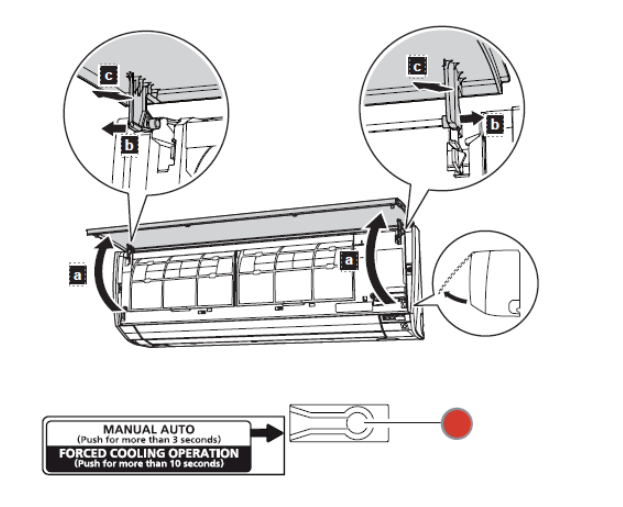
1. Locate the MANUAL/AUTO button
| 1 | Stand in front of the indoor unit and carefully lift the front panel upwards. |
| 2 | Raise the panel until it remains open. Do not force the hinges. |
| 3 | Look on the right-hand side of the indoor unit for a small push button labelled MANUAL/AUTO, AUTO or OPERATION. |
Do not remove electrical covers or touch wiring, terminals or circuit boards. Only operate the accessible push button.
2. Start normal automatic operation
| 1 | Press and hold the MANUAL/AUTO button for approximately 3 seconds, then release it. |
| 2 | The OPERATION indicator should illuminate and the indoor fan should start. |
| 3 | Carefully close the front panel. |
What the system will do: The air conditioner selects automatic operating conditions using the room temperature and its internal controls. Fan speed and temperature are normally controlled automatically.
3. Stop the air conditioner
Open the front panel and press the MANUAL/AUTO button again. The OPERATION indicator should turn off and the air conditioner will stop.
4. Important operating limitations
| Function | Available without remote? |
|---|---|
| Start and stop | Yes |
| Automatic operating mode | Yes |
| Select cooling or heating manually | Generally no |
| Adjust temperature | No |
| Adjust fan speed | No |
| Timer and advanced functions | No |
The outdoor unit may not start immediately. In heating mode there may be a delay while the system performs protection or warm-up functions.
5. Do not activate forced cooling
Do not hold the button for more than 10 seconds. On many models, holding the MANUAL/AUTO button for more than 10 seconds starts forced cooling operation. This function is intended for qualified service technicians and commissioning work, not normal customer operation.
| Button operation | Result |
|---|---|
| Hold for approximately 3 seconds | Normal MANUAL/AUTO operation |
| Hold for more than 10 seconds | Forced cooling - technician use only |
6. When further assistance is required
Further assistance may be required when:
- The OPERATION indicator does not illuminate.
- The air conditioner starts but stops shortly afterwards.
- Indicator lamps flash repeatedly.
- The indoor fan operates but the room does not cool or heat.
- The MANUAL/AUTO button is missing, damaged or inaccessible.
For full control of temperature, mode, fan speed and timers, obtain the correct replacement remote controller using the complete indoor-unit model number.
Button location, labelling and timing can vary slightly between models. Always follow the operating manual for the exact indoor-unit model where available.