
General Assist Technical Reference
C-Bus Controlled PIR Motion Sensor
Example occupancy control and HVAC dry-contact integration
Conceptual example for C-Bus, PIR, push-button and external-input control
This example shows how a C-Bus-controlled passive infrared sensor can be used with a relay output and manual push button to control an air-conditioning external input. The exact terminal assignment and control behaviour must be confirmed against the C-Bus relay, PIR and air-conditioning installation manuals.
Important: Do not apply voltage to an air-conditioning dry-contact input unless the product documentation specifically requires it. Incorrect wiring can damage the indoor-unit PCB or connected control equipment.
1. Circuit overview
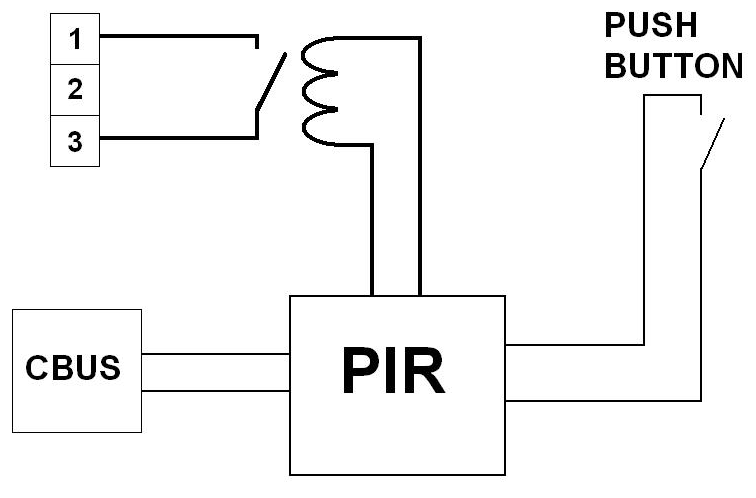
| Component | Function |
|---|---|
| C-Bus network | Carries occupancy, push-button and control-group commands between compatible C-Bus devices. |
| PIR sensor | Detects movement and initiates the programmed occupancy-control logic. |
| Push button | Provides manual control or override according to the programmed C-Bus logic. |
| Relay contact | Provides an isolated contact that can be connected to a compatible HVAC external input. |
Terminal identification: The drawing shows a changeover-style contact with terminals 1, 2 and 3, but it does not positively identify common, normally open and normally closed. Based on the linework, terminals 1 and 3 appear to be the switched contact pair and terminal 2 appears unused; however, this must be verified with a continuity test or the relay manufacturer’s wiring diagram before connection.
2. How the control sequence works
Automatic occupancy operation
- The PIR detects movement within its sensing area.
- The programmed C-Bus group or logic command changes state.
- The associated relay energises or de-energises.
- The relay contact changes state and presents an ON, OFF or enable signal to the connected HVAC input.
- After the configured vacancy delay expires, the relay returns to its programmed state.
Manual control
The push button can be programmed to toggle the same control group, provide a timed override, force the system on, or cancel automatic operation. Its exact behaviour depends on the C-Bus programming and should not be assumed from the wiring diagram alone.
3. Typical application states
| Control condition | Typical result |
|---|---|
| Motion detected | HVAC enable or ON contact is activated. |
| No motion for the programmed delay | HVAC enable contact is released or an OFF command is issued. |
| Manual push-button override | The programmed override, toggle or timed-control action is applied. |
| C-Bus schedule, scene or BMS command | The circuit can be enabled, inhibited or coordinated with lighting and other services. |
4. Fujitsu air-conditioning integration
Where supported, the relay contact may be connected to a Fujitsu indoor-unit external input or an approved external-connect interface. The input must then be configured for the required function, such as operation enable, forced stop, start/stop or other model-specific control.
| Item | Requirement |
|---|---|
| Contact type | Use a genuine volt-free contact where the Fujitsu input is specified as dry contact. |
| Input interface | Use the indoor PCB input or the specified external-connect kit for the applicable model. |
| Function setting | Configure the external input function in accordance with the installation or service manual. |
| Control priority | Confirm how the external input interacts with wired controllers, wireless controllers, central control and schedules. |
Do not assume terminal 1 is common or terminal 2 is the ON input. Terminal numbering varies between relay products. Confirm common, normally open and normally closed before connecting the air-conditioning input.
5. Commissioning checklist
- Confirm the relay contact rating and whether it is genuinely volt-free.
- Identify common, normally open and normally closed with the manufacturer’s diagram or a continuity meter.
- Confirm the Fujitsu input terminal, required connector and permitted contact arrangement.
- Set the correct indoor-unit external-input function.
- Program the PIR occupancy timeout and push-button override behaviour.
- Test motion detection, vacancy timeout, manual override and system recovery after power interruption.
- Confirm that local and central controllers behave as intended while the external input is active.
- Label the relay, field wiring and HVAC input for future service personnel.
6. Benefits
- Energy efficiency: reduces unnecessary air-conditioning operation in vacant areas.
- Building integration: coordinates HVAC with lighting, schedules, scenes and central automation.
- Occupant control: retains manual override where required.
- Electrical isolation: a correctly selected relay separates the C-Bus control network from the HVAC input circuit.
This drawing is a conceptual control example only. Always use the installation instructions for the specific C-Bus relay, PIR sensor and Fujitsu air-conditioning model.