
General Assist Technical Reference
Wiring Design - Three Wired Remote Controllers
Controller quantity limits, permitted combinations and group-control wiring
Three wired remote controllers cannot be connected to one indoor unit or one remote-controller group. A system may use a maximum of one or two compatible wired remote controllers.
1. Controller quantity limits
| Configuration | Maximum controllers | Status |
|---|---|---|
| Single indoor unit | 2 | Permitted when compatible controllers are configured as primary and secondary |
| Remote-controller group of up to 16 indoor units | 2 | Permitted subject to model compatibility |
| Any system with 3 wired controllers | 3 | Prohibited |
2. System wiring
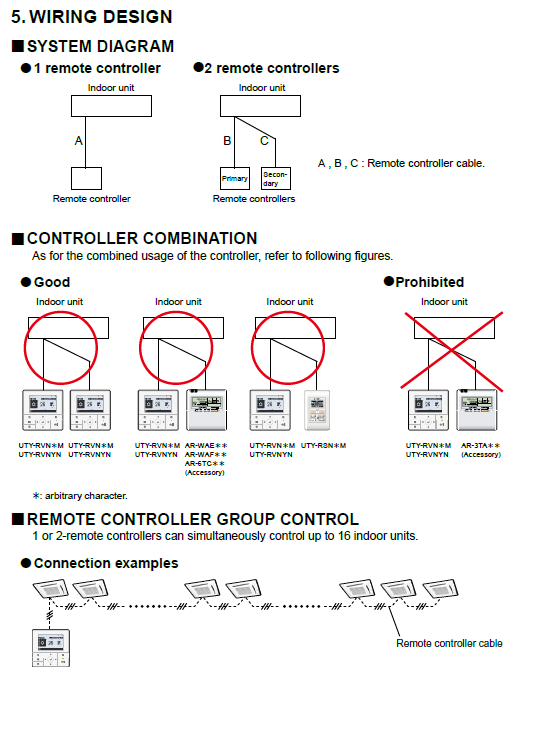
One-controller system: One wired controller connects to the indoor unit using the remote-controller cable.
Two-controller system: Two compatible wired controllers connect to the indoor unit and must be assigned as Primary and Secondary where required by the controller model.
Two-controller system: Two compatible wired controllers connect to the indoor unit and must be assigned as Primary and Secondary where required by the controller model.
Upload the supplied wiring diagram to Freshdesk and replace the image URL above.
3. Controller combination rules
Only controller combinations shown as approved in the applicable installation manual may be used. Controller compatibility can vary by indoor-unit series and controller model.
| Combination | Status |
|---|---|
| Two compatible wired remote controllers listed in the product documentation | Permitted |
| Compatible wired controller combined with an approved accessory controller | Permitted where specifically shown |
| AR-3TA-series accessory combined with the controller arrangement marked as prohibited in the wiring diagram | Not permitted |
| Three wired remote controllers | Not permitted |
An asterisk in a controller model number indicates an arbitrary model character or regional variation.
4. Remote-controller group control
One or two compatible wired remote controllers can simultaneously control a group of up to 16 indoor units.
1 or 2 wired controllers → Indoor unit 1 → Indoor unit 2 → ... → Indoor unit 16
5. Installation requirements
| 1 | Confirm that every controller is approved for the indoor-unit model and intended combination. |
| 2 | Configure primary and secondary controller settings where required. |
| 3 | Maintain the required terminal polarity for polar remote-controller wiring. |
| 4 | Use the cable type, conductor size and total cable length specified in the applicable installation manual. |
| 5 | Do not connect a third wired remote controller. |
Important: The diagram is a general wiring reference. Always confirm controller compatibility, terminal type, addressing requirements and cable limits in the installation manual for the specific indoor unit and controller models.