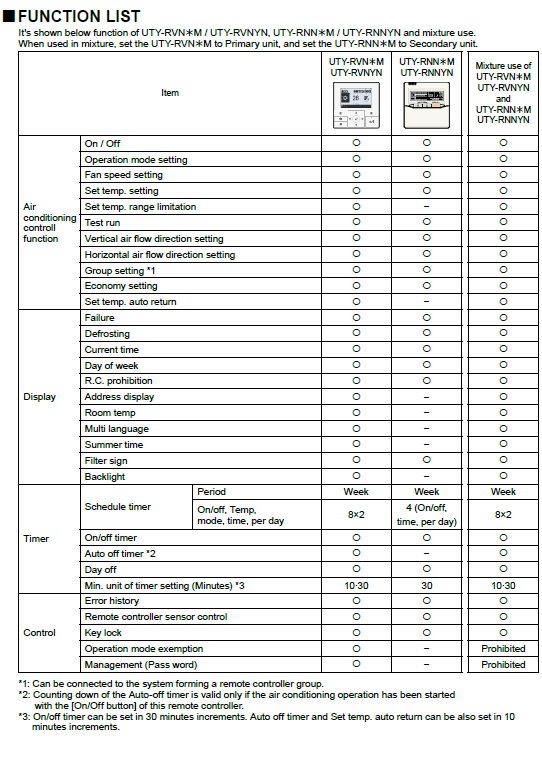
Wired Remote Controller Comparison: Backlit and Standard Models
Use this guide to compare the available functions of the backlit and standard wired remote controllers, including supported mixed-controller configurations.
Applicable Models:
Backlit Controller: UTY-RVNXM / UTY-RVNYN
Standard Wired Remote Controller: UTY-RNNXM / UTY-RNNYN
Mixed Configuration: UTY-RVNXM (Primary) + UTY-RNNXM (Secondary)
1. Overview
Both the backlit and standard wired remote controllers provide precise control over air conditioning operation and system monitoring.
However, the backlit model (UTY-RVNXM) offers enhanced visibility, user convenience, and expanded functionality, making it more suitable for advanced applications and multi-language environments.
2. Functional Comparison
Table key: Yes = supported; No = not available; Prohibited = configuration is not permitted.
| Function Category | Item | Backlit Controller (UTY-RVNXM / UTY-RVNYN) | Standard Controller (UTY-RNNXM / UTY-RNNYN) | Mixture Use |
|---|---|---|---|---|
| Air Conditioning Control | On / Off | Yes | Yes | Yes |
| Air Conditioning Control | Operation mode selection | Yes | Yes | Yes |
| Air Conditioning Control | Fan speed setting | Yes | Yes | Yes |
| Air Conditioning Control | Set temperature adjustment | Yes | Yes | Yes |
| Air Conditioning Control | Temperature range limitation | Yes | Yes | Yes |
| Air Conditioning Control | Test run function | Yes | Yes | Yes |
| Air Conditioning Control | Vertical airflow direction | Yes | Yes | Yes |
| Air Conditioning Control | Horizontal airflow direction | Yes | Yes | Yes |
| Air Conditioning Control | Group setting (*1) | Yes | Yes | Yes |
| Air Conditioning Control | Economy mode | Yes | Yes | Yes |
| Air Conditioning Control | Auto return temperature | Yes | Yes | Yes |
| Display | Failure indication | Yes | Yes | Yes |
| Display | Defrost indication | Yes | Yes | Yes |
| Display | Current time display | Yes | Yes | Yes |
| Display | Day of week | Yes | Yes | Yes |
| Display | Address display | Yes | Yes | Yes |
| Display | Room temperature display | Yes | Yes | Yes |
| Display | Multi-language support | Yes | No | Yes |
| Display | Summer time adjustment | Yes | No | Yes |
| Display | Filter sign display | Yes | Yes | Yes |
| Display | Backlight illumination | Yes | No | Yes |
| Timer Functions | Schedule timer | Week-based (8×2) | Week-based (4×1) | Week-based (8×2) |
| Timer Functions | On/Off timer | Yes | Yes | Yes |
| Timer Functions | Auto-off timer (*2) | Yes | Yes | Yes |
| Timer Functions | Day off setting | Yes | Yes | Yes |
| Timer Functions | Timer unit setting (*3) | 10 / 30 min | 30 min | 10 / 30 min |
| Control and Management | Error history | Yes | Yes | Yes |
| Control and Management | Remote controller sensor control | Yes | Yes | Yes |
| Control and Management | Key lock | Yes | Yes | Yes |
| Control and Management | Operation mode exemption | Yes | Prohibited | No |
| Control and Management | Password management | Yes | Prohibited | No |
3. Functional Notes
Group setting: Both controllers can be configured to operate as part of a remote controller group.
Auto-off timer: Valid only if air conditioning operation has been initiated via the controller’s On/Off button.
Timer increments:
Backlit model: Adjustable in 10-minute or 30-minute intervals.
Standard model: Adjustable only in 30-minute intervals.
4. Key Advantages of the Backlit Controller
Enhanced visibility in low-light environments.
Multi-language support for global installations.
Expanded scheduling options (8×2 programmable timers).
Password and mode restriction management for administrative control.
Advanced user feedback, including filter sign and summer time adjustments.
Selection guidance: Choose the backlit controller where visibility, multi-language support, expanded scheduling, password management or operation-mode restrictions are required.