PFC PCB Software Error – Error Code 19 / 33
Outdoor unit PFC board software identification and replacement guidance
Quick Answer
If the PFC PCB software version is 51011 or 51028, replace the PFC board with the updated version containing software 51035.Background
Field reports have identified occurrences of Error Code 19 (PFC PCB error) displayed on the outdoor unit LEDs, or Error Code 33 appearing on the wired remote controller.
This fault has been traced to earlier versions of the PFC (Power Factor Correction) PCB software.
Action Required
Technicians are instructed to check the software version on the PFC board located within the outdoor unit control section.
If the installed software version is 51011 or 51028, the PFC board must be replaced with the updated version.
Software Versions
| Software Type | Version Number |
|---|---|
| Old – replace | 51011 / 51028 |
| New – current | 51035 |
Identification Method
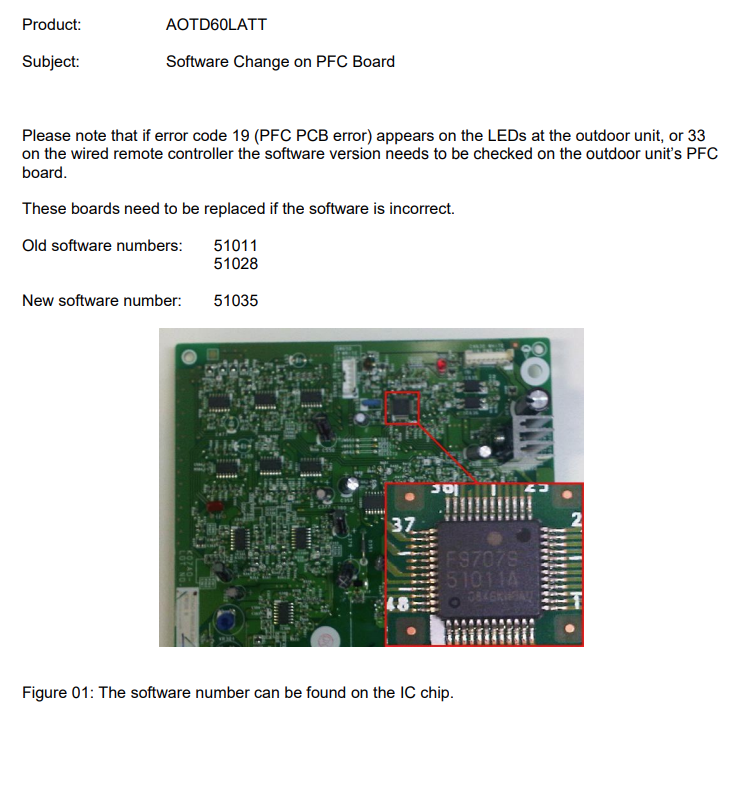
- The software number is printed directly on the IC chip mounted on the PFC PCB.
- Remove power and access the outdoor PCB compartment.
- Carefully inspect the chip marking. The software version, for example 51011A, will be printed below the IC identifier.
Important: Isolate power before accessing or handling the outdoor unit control section or PCB assemblies.
Corrective Action
- Isolate power before handling electronic components.
- Access the PFC board in the outdoor unit control box.
- Confirm the software number printed on the IC chip.
- If the version is 51011 or 51028, replace the PFC board with the latest revision containing software 51035.
- Restore power and confirm normal system operation. Error Code 19 or 33 should not reappear.
Notes for Service Teams
- This update resolves intermittent PFC communication and current feedback issues that can trigger Error Codes 19 / 33.
- Replacement boards with software 51035 are backward compatible with all AOTD60LATT systems.
- Always handle PCBs using ESD-safe procedures and confirm correct wiring after replacement.
Summary
| Fault | Cause | Remedy |
|---|---|---|
| Error Code 19 (Outdoor Unit) Error Code 33 (Wired Controller) | Outdated PFC board software 51011 / 51028 | Replace with updated board Software 51035 |
PFC PCB Software Identification
Figure 01: Example of IC chip identification showing software version “51011A”.